Most new users make the same mistake: they turn everything on, take every signal, and feel overwhelmed. This 7-day plan gives you a clean, integrated learning path that combines installation, settings, and core rules so you can build confidence without guessing.
THE GOAL OF WEEK 1
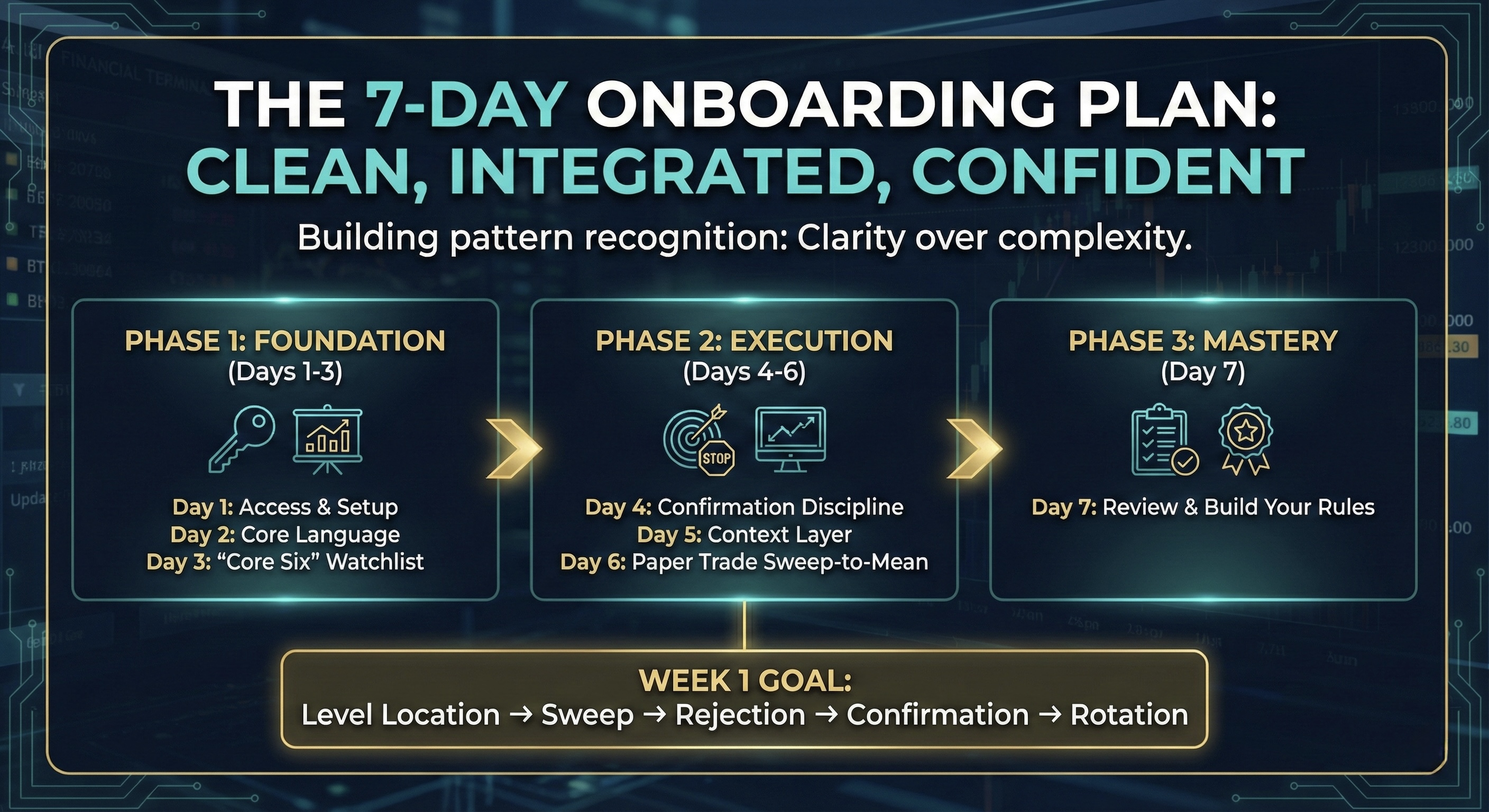
You are not trying to “trade perfectly.” You are building pattern recognition: Level Location → Sweep → Rejection → Confirmation → Rotation.
IMPORTANT: Elev8+ Is a 4-Indicator Suite
The Elev8+ system can be used with a single indicator, but it’s designed as a suite for cleaner confluence. Your execution model stays the same—these tools simply make your decisions more obvious:
- Elev8+ Pro: Signals + execution levels (your primary “entry signal”, and sweep levels).
- Market Map: Session structure, overnight context, and key levels (where reactions matter most).
- Market Extremes: Exhaustion and Divergence (helps you avoid mid-range chop and prioritize where the market is more likely to reverse or stall).
- Momentum Gaps: Inefficiencies, FVGs, and Order Blocks (helps define clean rotation paths and targets after confirmation).
For Week 1, we keep things minimal on purpose. You’ll start with Elev8+ Pro only, then add one context layer when you’re ready.
What You’ll Do Each Day
- Day 1: Installation + minimal chart setup
- Day 2: Learn the core language (sweep anatomy)
- Day 3: Build your “Core Six” levels watchlist
- Day 4: Confirmation + invalidation discipline
- Day 5: Add one context layer (optional)
- Day 6: Paper trade the sweep-to-mean
- Day 7: Review + write your rules
Day 1: Installation & Minimal Chart Setup
Confirm your TradingView username is registered. Log in to TradingView and check the Invite-Only Scripts section. Click the each Elev8+ indicator to add it to your chart.
If the script is missing, see the Troubleshooting section at the bottom of this post (Issue #1).
Go into the indicator settings and apply the Minimal Preset for maximum clarity.
- Enable: Elev8+ Reversal Signals (Triangles), and Liquidity Sweep Boxes + Labels
- Enable: Sweep Levels+ (set to show only PDH, PDL, London & Asian H/L).
- Leave Off: EMA Ribbon, and Bollinger Deviation Zones.
Your only job today is to have a clean, working chart showing only major levels and basic signals. (You can add Market Map / Extremes / Momentum Gaps later once the core language is familiar.)
Day 2: Learn the Core Language (Sweep Anatomy)
- Study the legend: Learn what the Triangle, LS labels, and Sweep Boxes represent (you can see the full legend here: https://elev8plus.trading/blog/chart-legend-guide).
- Scroll back: Review the last 5 trading days on a 5-minute chart.
- Identify: Find 10 clean sweeps (long wick, closes back inside the level) and 10 messy sweeps (short wick, chop, mid-range).
- The rule: Practice waiting for the candle to close. If you enter while price is still running the level, you’re trading the stop-hunt, not the confirmed reversal.
Day 3: Build a “Core Six” Levels Watchlist
The biggest execution upgrade is a short, intentional watchlist. Don’t trade what you haven’t prepared for.
- PDH / PDL (Prior Day High / Low)
- Weekly High / Low (only if price is near them)
- Asia H/L and London H/L (depending on your session focus)
Go into your Sweep Levels+ settings and disable every level that is not on your list. If a level is far from current price, it does not belong on your execution chart.
Tip: Market Map strictly shows PDH/PDL and overnight Session Highs/Lows if you want to leave Sweep Levels+ turned off and only use Market Map is an option, but your execution chart should stay clean—only keep what matters today.
Day 4: Confirmation & Invalidation Discipline
The most consistent first objective after a qualified sweep is a rotation back toward value.
- Stop practice: Mark the sweep wick extreme (the high/low of the rejection candle). This is your invalidation point.
- Target practice: Identify VWAP (Volume Weighted Average Price) or the mid-range of recent structure. This is your first objective.
- The rule: If your target is not at least 2× your stop distance (2R), the trade is low quality. Skip it.
Optional confluence: Momentum Gaps can help map cleaner rotation objectives (gap fills/inefficiencies), and Market Extremes can help confirm whether you’re trading a boundary versus mid-range chop.
Day 5: Add Multiple Context Layers
Once you feel comfortable, add more context layers that improves clarity. Do not add multiple layers at once.
- Option A (Structure): Add Market Map to see key levels and session structure (helps confirm if your sweep is happening at a meaningful location).
- Option B (Regime): Add Market Extremes to identify reversal boundaries vs mid-range chop (helps you avoid forcing trades in “no-man’s land”).
- Option C (Targets): Add Momentum Gaps to map clean rotation paths and objectives after confirmation (helps you avoid guessing targets and pullback areas).
- Option E (Trend Context): Add the EMA Ribbon and the EMA Trend Cloud inside Elev8+ Pro to see macro trend context (helps you avoid fighting a steep trend day).
If clarity decreases after adding a layer, immediately revert to the Minimal Preset or adjust settings to suite you.
Day 6: Paper Trade the Sweep-to-Mean
Using your checklist (Level, Sweep, Confirmation), paper trade the setup.
- Entry: On the open of the candle after the Triangle/LS signal confirms.
- Stop: Beyond the sweep wick.
- Exit: Use a fixed 2R target at your calculated value zone (VWAP / mid-range). Do not trail today. Focus only on entry quality.
Optional confluence (keep it simple): if you added Market Map/Extremes/Gaps on Day 5, use it only to validate location/regime/targets—do not change your execution rules yet.
Day 7: Review & Build Your Rules
Use the Trading Journal to review your Day 6 trades and extract 3 non-negotiable rules you will follow next week.
- Example: “I only trade Elev8+ Signals when at a Key Level (PDH/PDL, Previous Session Highs/Lows, 1h/4h Support & Resistance Levels, Market Extreme Zones, or Momentum Gaps).”
- Example: “If price fails to break a micro high/low in my favor after entry, I move stops to breakeven and wait for another valid setup.”
Your rules must be based on your personal execution performance and emotional triggers.
Elev8+ Troubleshooting & FAQ
- Check username: Confirm your TradingView username is correct (spelling and case matter).
- Refresh: Log out and log back into TradingView, then check Profile → Invite-Only Scripts.
- Toggles: Open indicator settings and ensure Reversal Signals (Triangles) and Sweep Levels+ are enabled.
- Chart type: Make sure you’re on Candles, not Bars or Heikin-Ashi.
- Solution: Reduce your Sweep Levels+ list. Disable longer-horizon levels (Monthly/Yearly) and keep only the Core Six.
- Best practice: Your goal isn’t to see every level—it’s to see the few magnets that matter today.
Closing Framework
Clarity over complexity. Week 1 is about learning the language.